KubeDrive MCP Server
Your Kubernetes clusters for AI agents through the KubeDrive desktop app, without a kubeconfig.
KubeDrive scores 52 (Fair), with no SPDX license recorded and written in Go. It installs as a local process. It does not declare tools yet. Filed under Developer tools. GitHub shows 0 stars. Install configs are generated for 10 clients. Being listed in the registry is not the same as being vendor-official.
Fair trust
52 of 100 from six public signals. Nobody can buy a point.
- Listed in the official MCP registry.
- No license recorded.
License, quality and maintenance
Quality: Grade C
65/100 for listing completeness. Lost points: no listed tools, short summary.
How quality is graded
Where the 52 comes from
22 + 20 + 0 + 0 + 7 + 3 = 52. Each factor is capped, so no single signal can carry a listing.
Active in the official MCP registry, plus a known vendor namespace.
Registry: 22 of 30 points.How recently the repository saw a commit or release.
Maintenance: 20 of 20 points.GitHub stars and weekly downloads, on a log scale.
Popularity: 0 of 20 points.A clear, OSI-style open-source license.
License: 0 of 10 points.Not archived, a secure install path, a pinned version.
Security: 7 of 10 points.A real summary, a README with depth, listed tools.
Docs: 3 of 10 points.Install
Pick your client, copy the config, paste it in.
Needs Cursor or VS Code installed on this device. The button opens the app and asks you to confirm before it adds the server.
{ "mcpServers": { "aleksskoz-kubedrive": { "command": "npx", "args": [ "-y", "https://github.com/aleksskoz/kubedrive/releases/download/v0.6.6/kubedrive-0.6.6.mcpb" ], "env": { "KUBEDRIVE_MCP_TOKEN": "YOUR_KUBEDRIVE_MCP_TOKEN", "KUBEDRIVE_MCP_URL": "http://127.0.0.1:47011/mcp" } } }}
Environment variables
| Name | Required | Notes |
|---|---|---|
KUBEDRIVE_MCP_TOKENSecret | Required | The client token from KubeDrive → AI Agents, after the server is turned on; starts with kd_ |
KUBEDRIVE_MCP_URL | Optional | KubeDrive's MCP endpoint, only if its port was changed |
Tools
All capabilitiesTools show up when the registry metadata or the repository README lists them. Public READMEs are read directly. A GitHub token is used only when one is already configured.
About
A fast, native desktop client for Kubernetes, for macOS, Windows and Linux: cluster health, live resources, logs, terminal, Helm and port-forwarding, driven from the keyboard, with an MCP server that lets AI agents work on your clusters without a kubeconfig.
Download · Website · Docs · Performance · AI agents · Pricing
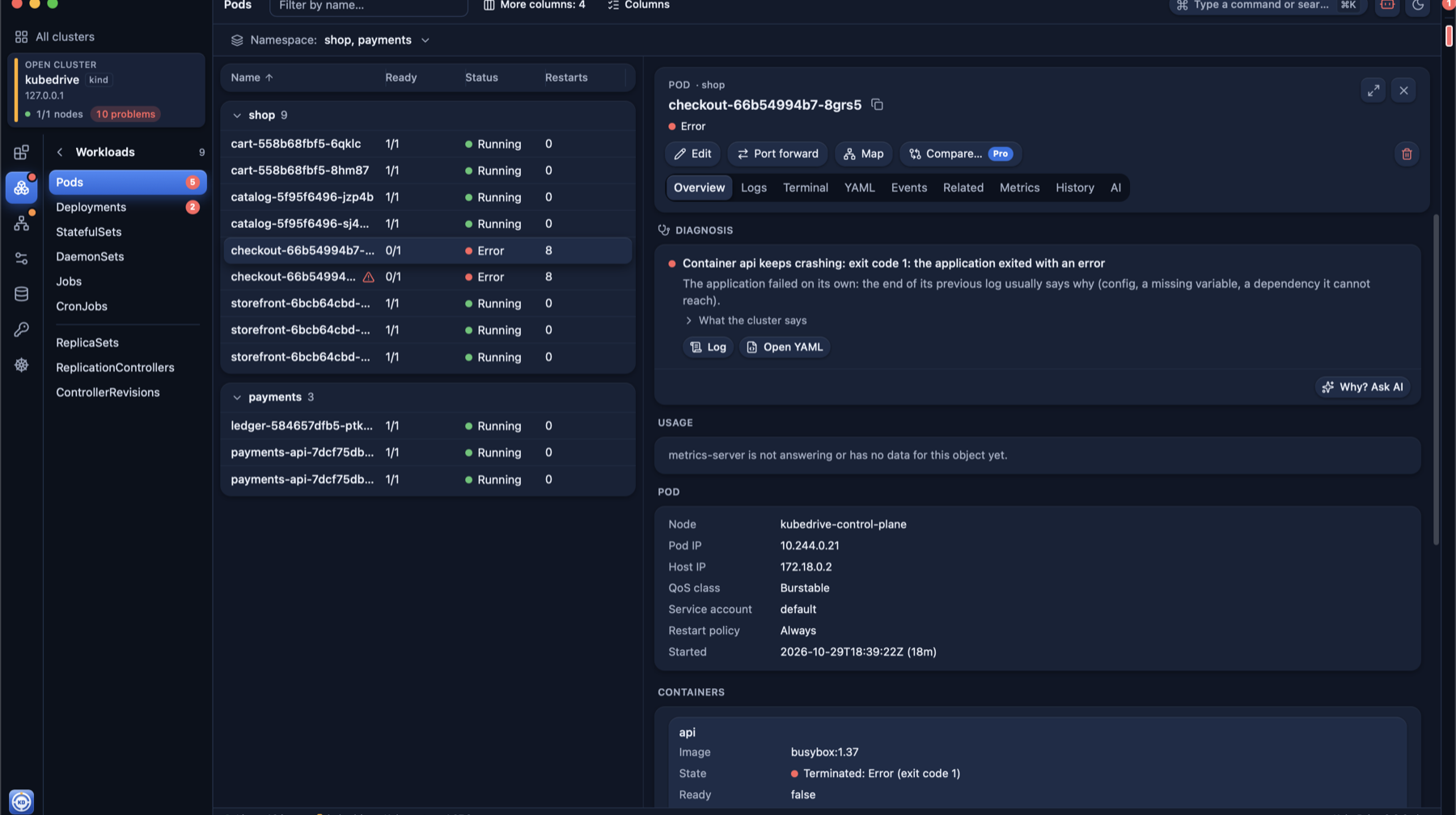
This repository hosts KubeDrive releases, the issue tracker, the benchmarks and
the source of the MCP bridge (kubedrive-mcp, Apache-2.0), the one open part of
KubeDrive. The app itself is closed source.
Why KubeDrive
- Fast at production scale. 50,000 pods on 470 nodes: first rows in 3 s, the full list in
10 s, 428 MB of memory, where
kubectl get pods -Atakes 27 s on the same cluster. KubeDrive asks the API server for tables, not objects, and streams the first page while the rest loads. Numbers, method and the other clients on the performance page; scripts and raw results inbenchmarks/. - Safe on production, by default. A cluster whose context name looks like production is protected from the start: a red window frame, and every change asks you to type the object's name. Helm charts install with a dry run first. Actions your RBAC role does not allow are disabled, not hidden.
- Nothing to install in the cluster. KubeDrive reads the kubeconfig you already have, with your SSO sessions and your permissions, and talks to your API servers directly. Cluster data never reaches our servers.
- One screen for all clusters, with their health; diagnosis of crashing pods; metrics from the Prometheus you already run; an upgrade check that lists what the next Kubernetes version breaks; a map of a namespace; a browser extension that opens EKS, GKE, AKS, Argo CD, Grafana and Rancher pages in KubeDrive.
- Free for daily work with two clusters open. Pro adds unlimited clusters, full Helm, PromQL, aggregated logs, change history and more.
AI agents without a kubeconfig
KubeDrive serves your clusters to Claude Code, Codex, Cursor, Claude Desktop and any other
MCP client. The agent asks KubeDrive; KubeDrive answers with
the connections it already has. The agent never gets a kubeconfig or a cluster token, sees only
the clusters you tick, and the server listens on 127.0.0.1 only.
claude mcp add --transport http kubedrive http://127.0.0.1:47011/mcp \
  --header "Authorization: Bearer kd_…"
Reading is free. Changes by agents are part of Pro and every one of them waits for your Allow in a window with the diff; on a protected cluster you type the object's name. The AI agents guide has the setup for each client.
Install
Requirements: macOS 13 Ventura or later (Apple silicon or Intel); Windows 10 1809 or later or Windows 11 (x64 or Arm); Linux with GTK 4 and WebKitGTK 6.0: Debian 13, Ubuntu 24.04, Fedora 40 and newer (x64). The install guide has the details.
macOS
With Homebrew:
brew install --cask aleksskoz/tap/kubedrive
Or download KubeDrive-<version>.dmg from the latest release,
open it and drag KubeDrive to Applications. Each release lists the DMG's SHA-256:
shasum -a 256 -c KubeDrive-<version>.dmg.sha256
The app is signed with a Developer ID and notarized by Apple.
Windows
Download KubeDrive-<version>-x64-setup.exe from the latest release
(KubeDrive-<version>-arm64-setup.exe for Arm PCs) and run it. The installer is not code-signed
yet, so SmartScreen asks once: More info → Run anyway. The release notes carry each installer's
SHA-256. KubeDrive installs to C:\Program Files\AKStudio\KubeDrive and adds the WebView2 runtime if
the PC has none.
Linux
From KubeDrive's package repository, so that system updates bring new versions too. Debian 13, Ubuntu 24.04 and newer:
sudo install -d -m 0755 /etc/apt/keyrings
curl -fsSL https://kubedrive.com/kubedrive.gpg | sudo tee /etc/apt/keyrings/kubedrive.gpg >/dev/null
echo "deb [signed-by=/etc/apt/keyrings/kubedrive.gpg] https://kubedrive.com/apt stable main" |
  sudo tee /etc/apt/sources.list.d/kubedrive.list
sudo apt update && sudo apt install kubedrive
Fedora 40 and newer:
sudo tee /etc/yum.repos.d/kubedrive.repo <<'EOF'
[kubedrive]
name=KubeDrive
baseurl=https://kubedrive.com/rpm
enabled=1
gpgcheck=1
repo_gpgcheck=1
gpgkey=https://kubedrive.com/kubedrive.asc
EOF
sudo dnf install kubedrive
Or download kubedrive_<version>_amd64.deb or kubedrive-<version>.x86_64.rpm from the
latest release and install it with
sudo apt install ./… or sudo dnf install ./…. The repository and the RPMs are signed with
KubeDrive's key (kubedrive.asc, fingerprint
87AE 5682 0F7C 659C 28CF 91F8 9D49 8CCC F6E3 1831).
Getting started
KubeDrive reads your kubeconfig the same way kubectl does ($KUBECONFIG or ~/.kube/config)
and talks only to your clusters. The one exception is the update check below.
Updating
On its second launch KubeDrive asks whether to check for updates automatically; if you agree, it looks at this repository's latest release once a day, without sending any data about you or your clusters. You can also check by hand at any time: KubeDrive → Check for Updates… on macOS, File → Check for Updates… on Windows and Linux.
- macOS updates itself. Every update is signed, and KubeDrive refuses one whose signature
doesn't match. Version 0.1.0 can't update itself: download the new DMG once, or run
brew upgrade --cask kubedrive. - Windows: the update notice links the installer for your PC; run it over the old version, your settings stay.
- Linux: with the package repository,
sudo apt upgradeorsudo dnf upgradeupdates KubeDrive like any other package; otherwise the update notice links the new package.
Uninstalling
- macOS:
brew uninstall --cask kubedrive(add--zapto remove settings and caches too). Without Homebrew, move KubeDrive to the Trash; settings live in~/Library/Application Support/KubeDrive. - Windows: Settings → Apps → KubeDrive → Uninstall. Settings stay in
%AppData%\KubeDriveuntil you delete the folder. - Linux:
sudo apt remove kubedriveorsudo dnf remove kubedrive. Settings stay in~/.config/KubeDrive.
KubeDrive never changes your kubeconfig, so there is nothing to undo there.
Benchmarks
benchmarks/ holds the scripts and raw results behind
kubedrive.com/performance: how fast KubeDrive and other
Kubernetes clients open 50,000 pods. They are MIT-licensed, so you can rerun them yourself.
Feedback
Found a bug or missing something? Open an issue.
License
KubeDrive is free to use under the license.
Frequently asked questions
What is KubeDrive MCP Server?
Your Kubernetes clusters for AI agents through the KubeDrive desktop app, without a kubeconfig.
How do I install KubeDrive MCP Server in Claude Desktop, Cursor, or VS Code?
Pick your client in the Install section on this page and copy the generated config into the client's config file. Step-by-step guides: Claude Desktop, Cursor, and VS Code. KubeDrive MCP Server runs locally from the MCP bundle https://github.com/aleksskoz/kubedrive/releases/download/v0.6.6/kubedrive-0.6.6.mcpb with the command npx -y https://github.com/aleksskoz/kubedrive/releases/download/v0.6.6/kubedrive-0.6.6.mcpb.
Does KubeDrive MCP Server support remote (HTTP) connections?
No remote endpoint is listed for KubeDrive MCP Server. It runs locally on your machine over stdio, started by your MCP client.
How is KubeDrive MCP Server's trust score calculated?
KubeDrive MCP Server scores 52 out of 100 (Fair). The score adds six capped public signals: registry status, maintenance, popularity, license, documentation, and security. Nobody can pay for points. Read the methodology for the full formula.
Reviews
No reviews yet—Be the first to review
No published reviews yet. Used it? Tell the next person how it went.
Sign inA verified email is required to review this server.
Add badge to your README
Paste either snippet into the repository README. The image links to this listing.

Manage this listing
Claim this serverRelated servers
kubernetes-mcp-server
by containers · Go
A Model Context Protocol (MCP) server for Kubernetes and OpenShift
Kubernetes MCP server for diagnosis, resource management, GitOps, and RBAC-enforced operations.
Read-only Model Context Protocol MCP server enabling code-driven AI analysis of Kubernetes clusters.
Heap histograms, Go profiles, crash logs and core dumps from Kubernetes pods before they died.
KSail
by devantler-tech · Go
SDK for creating, managing, and operating Kubernetes clusters and workloads with ease.
Governed Kubernetes ops — 55 MCP tools with audit, budget, undo, risk-tier audit labels.