google-jobs-per-result MCP Server
Google Jobs listings billed per result, via the Apify Google Jobs Scraper API, hosted MCP.
google-jobs-per-result scores 52 (Fair), with no SPDX license recorded. It can be reached as a remote MCP endpoint. It does not declare tools yet. Filed under Web scraping. Install configs are generated for 10 clients. Being listed in the registry is not the same as being vendor-official.
Fair trust
52 of 100 from six public signals. Nobody can buy a point.
- Listed in the official MCP registry.
- No license recorded.
License, quality and maintenance
Quality: Grade C
65/100 for listing completeness. Lost points: no listed tools, short summary.
How quality is graded
Where the 52 comes from
22 + 20 + 0 + 0 + 7 + 3 = 52. Each factor is capped, so no single signal can carry a listing.
Active in the official MCP registry, plus a known vendor namespace.
Registry: 22 of 30 points.How recently the repository saw a commit or release.
Maintenance: 20 of 20 points.GitHub stars and weekly downloads, on a log scale.
Popularity: 0 of 20 points.A clear, OSI-style open-source license.
License: 0 of 10 points.Not archived, a secure install path, a pinned version.
Security: 7 of 10 points.A real summary, a README with depth, listed tools.
Docs: 3 of 10 points.Install
Pick your client, copy the config, paste it in.
Needs Cursor or VS Code installed on this device. The button opens the app and asks you to confirm before it adds the server.
{ "mcpServers": { "johnisanerd-apify-google-jobs-pay-per-result": { "url": "https://mcp.apify.com/?tools=johnvc/google-jobs-scraper---pay-per-result" } }}
Environment variables
This server does not declare environment variables.
Tools
All capabilitiesTools show up when the registry metadata or the repository README lists them. Public READMEs are read directly. A GitHub token is used only when one is already configured.
About
💼 Google Jobs API (Pay Per Result): Job Listings in Clean JSON
Pay only for the results you get. The developer-friendly way to use the Google Jobs API.
Actor page: apify.com/johnvc/google-jobs-scraper---pay-per-result Input schema: apify.com/johnvc/google-jobs-scraper---pay-per-result/input-schema
This edition of the Google Jobs API bills per result returned, so your cost scales directly with the number of listings you keep. It searches Google Jobs and returns clean, structured JSON, one record per listing. Each job includes title, company, location, source platform, the full description, parsed metadata (posting date, schedule type, benefits), and direct apply links across platforms (LinkedIn, Indeed, company site, and more). Built-in company and source filters let you drop unwanted results before you pay for them. Supports location targeting, location-radius search, country and language filtering, and pagination.
Prefer per-page pricing instead of per-result? See the pay-per-page edition.
Video Walkthrough

Quick Start
Prerequisites
- Python 3.11 or higher
- An Apify account and API key (get a free key here)
-
Clone the repository
git clone https://github.com/johnisanerd/Apify-Google-Jobs-Pay-Per-Result.git cd Apify-Google-Jobs-Pay-Per-Result -
Install dependencies with UV
# Install UV if you do not have it: curl -LsSf https://astral.sh/uv/install.sh | sh # Install project dependencies: uv sync -
Configure your API key
cp .env.example .env # Edit .env and add your Apify API key # Get your free API key at: https://apify.com?fpr=9n7kx3 -
Run the example
uv run python google-jobs-pay-per-result-scraper.py
Alternative: set the API key directly
export APIFY_API_TOKEN="your_api_key_here"
uv run python google-jobs-pay-per-result-scraper.py
Why Use This Google Jobs API?
Pay only for results. Billing is per result returned, with no subscription. You decide how many listings to keep, and that is exactly what you pay for.
Filter before you pay. Built-in company and job-source filters (with optional regex matching) let you exclude staffing agencies, aggregators, or specific employers, so you are not charged for results you do not want.
One record per job, fully detailed. Every listing comes with title, company, location, source, the full description, and parsed metadata, so you can load it straight into an ATS, a dashboard, or an analysis pipeline.
Direct apply links. Each job includes apply options across platforms (LinkedIn, Indeed, the company careers site, and more) with direct URLs.
Targeted search. Filter by location, country, language, and Google domain, and use location-radius search to focus on a specific area.
Easy to automate. Call it from Python in a few lines, or load it as an MCP tool so assistants like Claude and Cursor can search jobs for you on demand.
Features
Core Capabilities
- Job search with location, country, language, and Google-domain targeting
- Location-radius search to focus results on a specific area
- Company filters to exclude specific employers (single value, list, or regex)
- Job-source filters to exclude specific platforms such as aggregators
- Pagination control with a configurable page cap
- Direct apply links across multiple platforms per job
Data Quality
- One record per job with a stable structure
- Full description text plus parsed metadata (posting date, schedule type, benefits)
- Apply options with platform names and direct URLs
- Search metadata echoed on every record
- Consistent JSON shape across every query
Usage Examples
Basic search
{
  "query": "Software Engineer",
  "location": "Austin, TX",
  "num_results": 10
}
Exclude job sources and a company, with localization
{
  "query": "Data Scientist",
  "location": "Berlin, Germany",
  "country": "de",
  "language": "de",
  "num_results": 20,
  "via_filter_list": ["ZipRecruiter"],
  "company_filter": "Staffing Agency A"
}
Input Parameters
| Parameter | Type | Required | Default | Description |
|---|---|---|---|---|
query | string | Yes | - | Job search query, e.g. Software Engineer, Data Scientist. |
location | string | No | - | Job location (city level recommended), e.g. Austin, TX. Leave empty for a worldwide search. |
country | string | No | None | Country code (ISO 3166-1 alpha-2), e.g. us, de. |
language | string | No | None | Language code for results, e.g. en. |
google_domain | string | No | google.com | Google domain to search. |
num_results | integer | No | 100 | Maximum number of job results to return. Minimum accepted is 10. Each returned result is billed. |
max_pagination | integer | No | 0 | Maximum pages to fetch (~10 results each); 0 = unlimited. |
include_lrad | boolean | No | false | Enable location-radius filtering. |
lrad_value | string | No | 5 | Radius in miles when include_lrad is true. |
max_delay | integer | No | 1 | Delay in seconds between requests, to avoid rate limiting. |
company_filter | string | No | - | Exclude jobs from specific companies; single name or comma-separated list. |
company_filter_list | array | No | - | Exclude companies as a list; takes precedence over company_filter. |
company_filter_regex | boolean | No | false | Treat company filters as regex patterns for flexible matching. |
via_filter | string | No | - | Exclude jobs from specific sources/platforms; single name or comma-separated list. |
via_filter_list | array | No | - | Exclude sources as a list; takes precedence over via_filter. |
output_file | string | No | - | Optional filename to save results. |
Output Format
A real result for Software Engineer in Austin, TX (one item per job; the full description, extensions, and detected_extensions are present but omitted here for readability, and job_id is truncated).
{
  "title": "Senior Software Engineer",
  "company_name": "Southwest Airlines",
  "location": "Austin, TX",
  "via": "Southwest Careers - Southwest Airlines",
  "apply_options": [
    {
      "title": "Southwest Careers - Southwest Airlines",
      "link": "https://careers.southwestair.com/us/en/job/R-2026-68331/Senior-Software-Engineer"
    }
  ],
  "job_id": "eyJqb2JfdGl0bGUiOiJTZW5pb3IgU29mdHdhcmUgRW5naW5lZXIiLCJjb21wYW55X25hbWUiOi...",
  "query": "Software Engineer",
  "country": "us",
  "language": "en",
  "google_domain": "google.com",
  "search_timestamp": "2026-05-29T11:21:31",
  "total_jobs_found": 10,
  "pages_processed": 1
}
Each job record also includes the full description text, an extensions array of raw tags (for example Full-time), a detected_extensions object with parsed fields like posting date and schedule type, plus share_link, source_link, and job_title.
Use as an MCP tool
You can load the Google Jobs API as an MCP tool so assistants call it for you. The MCP server URL preloads just this one Actor:
https://mcp.apify.com/?tools=actors,docs,johnvc/google-jobs-scraper---pay-per-result
Authenticate with OAuth in the browser when offered, or with your Apify API token (the same APIFY_API_TOKEN used by the Python example). Get a token at https://console.apify.com/settings/integrations and a free Apify account at https://apify.com?fpr=9n7kx3 .
Install in Claude Cowork Desktop
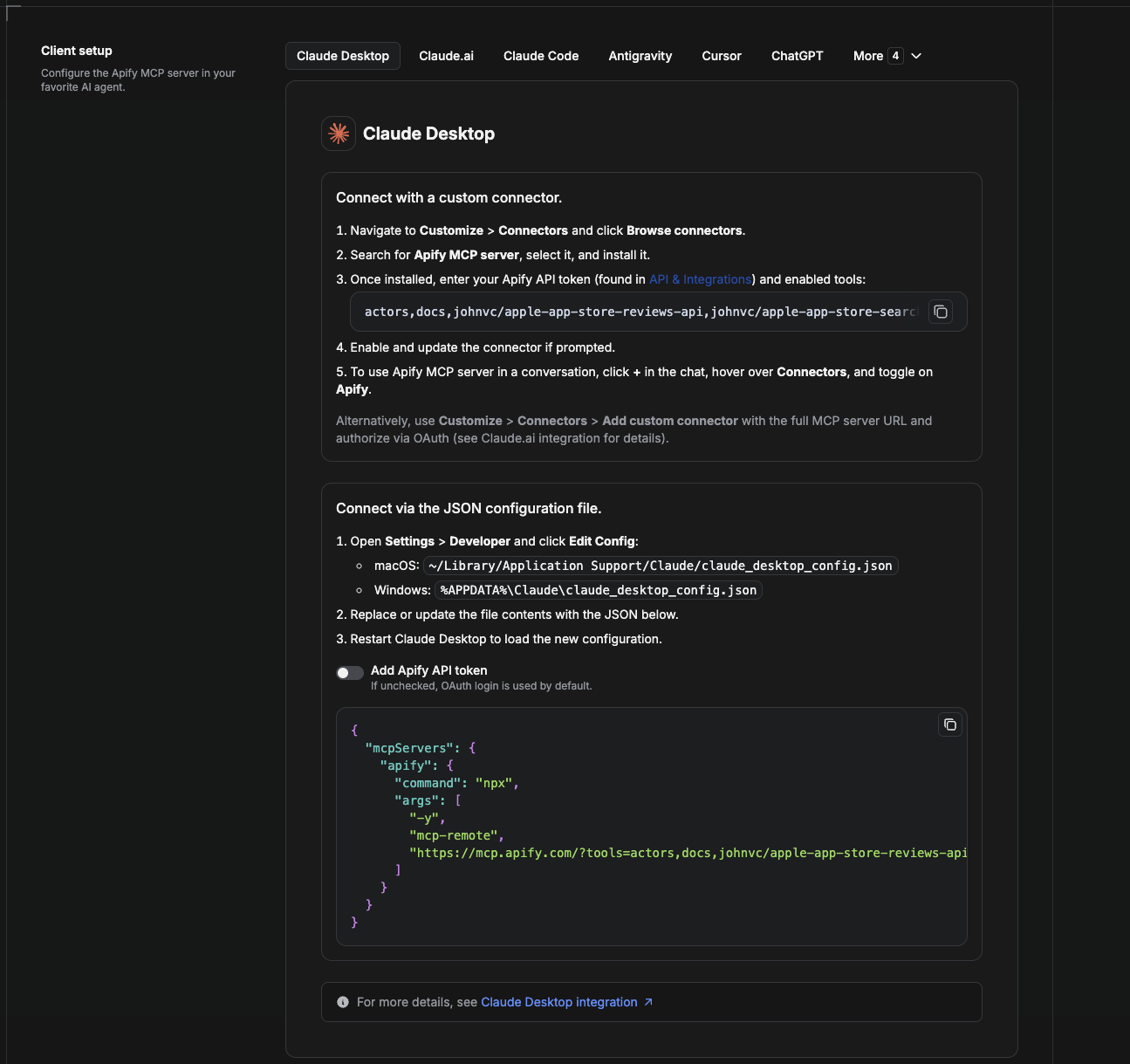
Cowork is the desktop app's automation mode. To give it the Google Jobs API as a tool, add the Apify MCP server as a connector.
- Open the Claude desktop app and go to Settings → Connectors (or Settings → Developer → Edit Config to edit
claude_desktop_config.jsondirectly).- macOS:
~/Library/Application Support/Claude/claude_desktop_config.json - Windows:
%APPDATA%\Claude\claude_desktop_config.json
- macOS:
- Add the Apify MCP server, preloaded with only this Actor:
{
  "mcpServers": {
    "apify": {
      "command": "npx",
      "args": [
        "-y",
        "mcp-remote",
        "https://mcp.apify.com/?tools=actors,docs,johnvc/google-jobs-scraper---pay-per-result"
      ]
    }
  }
}
- Restart the app. When Cowork first calls the tool, complete the OAuth prompt in your browser, or add your Apify API token in the connector settings to skip OAuth.
- In a Cowork chat, confirm the tool is available and ask it to run the Google Jobs API.
Download the desktop app and start a free trial: https://claude.ai/referral/uIlpa7nPLg More help: https://docs.apify.com/platform/integrations/claude-desktop
Install in Claude Code
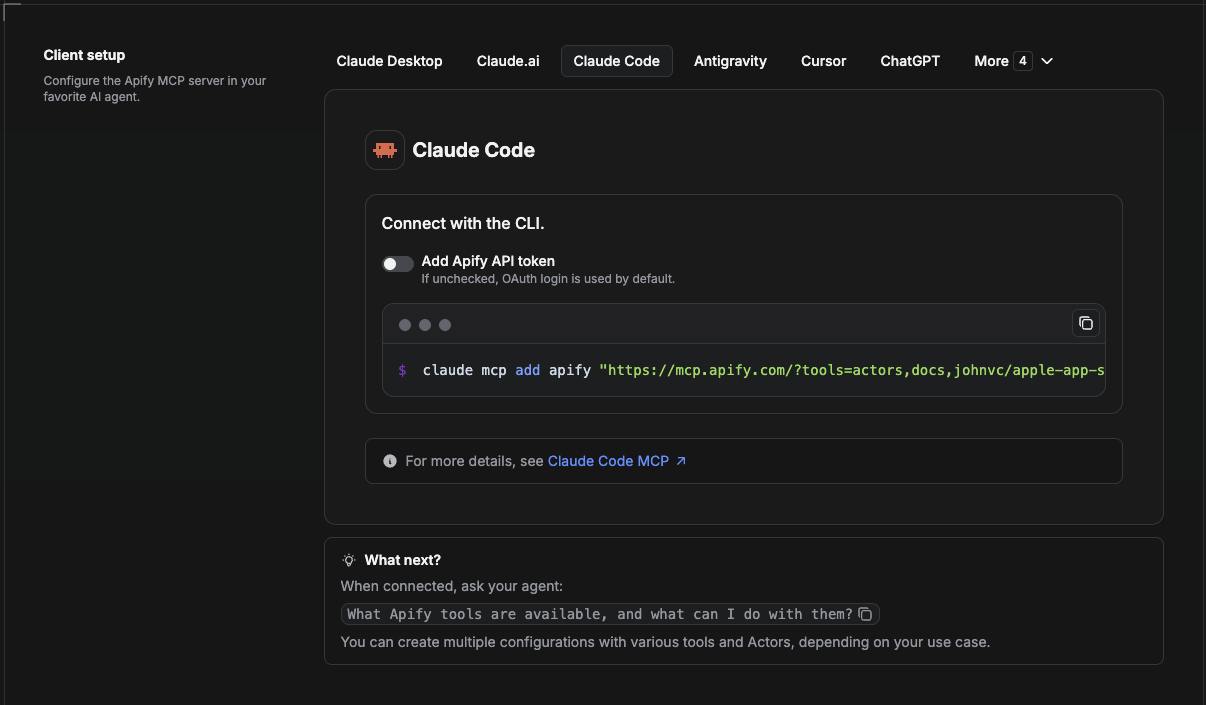
Claude Code is the command-line tool. Add the Actor's MCP server with one command:
claude mcp add --transport http apify \
  "https://mcp.apify.com/?tools=actors,docs,johnvc/google-jobs-scraper---pay-per-result"
To use a token instead of browser OAuth:
claude mcp add --transport http apify \
  "https://mcp.apify.com/?tools=actors,docs,johnvc/google-jobs-scraper---pay-per-result" \
  --header "Authorization: Bearer YOUR_APIFY_TOKEN"
Then verify with claude mcp list, or run /mcp inside a session. Ask Claude Code to call the Google Jobs API.
Try Claude Code free: https://claude.ai/referral/uIlpa7nPLg Claude Code MCP docs: https://code.claude.com/docs/en/mcp
Install in Claude (website)
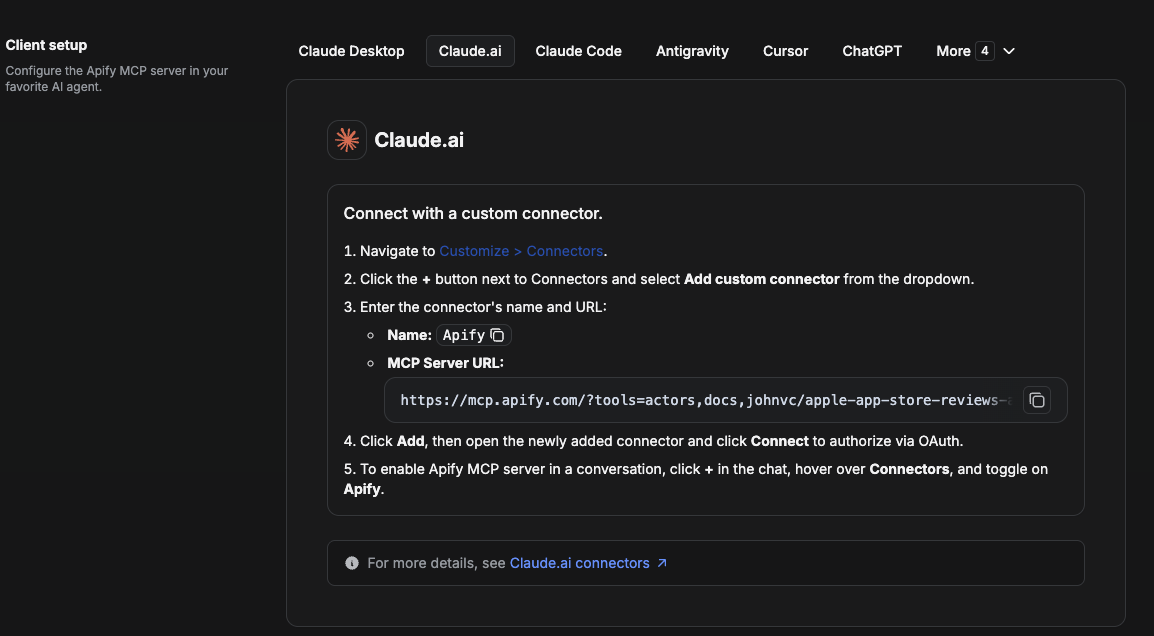
On claude.ai you add Apify as a connector, then enable just this Actor's tool.
- Go to Settings → Connectors → Browse connectors and search for Apify MCP server. Install it (enable or update if prompted).
- When connecting, authenticate with your Apify API token, and enable the tool
johnvc/google-jobs-scraper---pay-per-result. - In any chat, open + → Connectors and turn on Apify.
- Alternatively, choose Add custom connector and paste the full MCP URL
https://mcp.apify.com/?tools=actors,docs,johnvc/google-jobs-scraper---pay-per-result, using OAuth when prompted. - Ask Claude to run the Google Jobs API.
Open Claude on the web: https://claude.ai/referral/uIlpa7nPLg
Install in Cursor
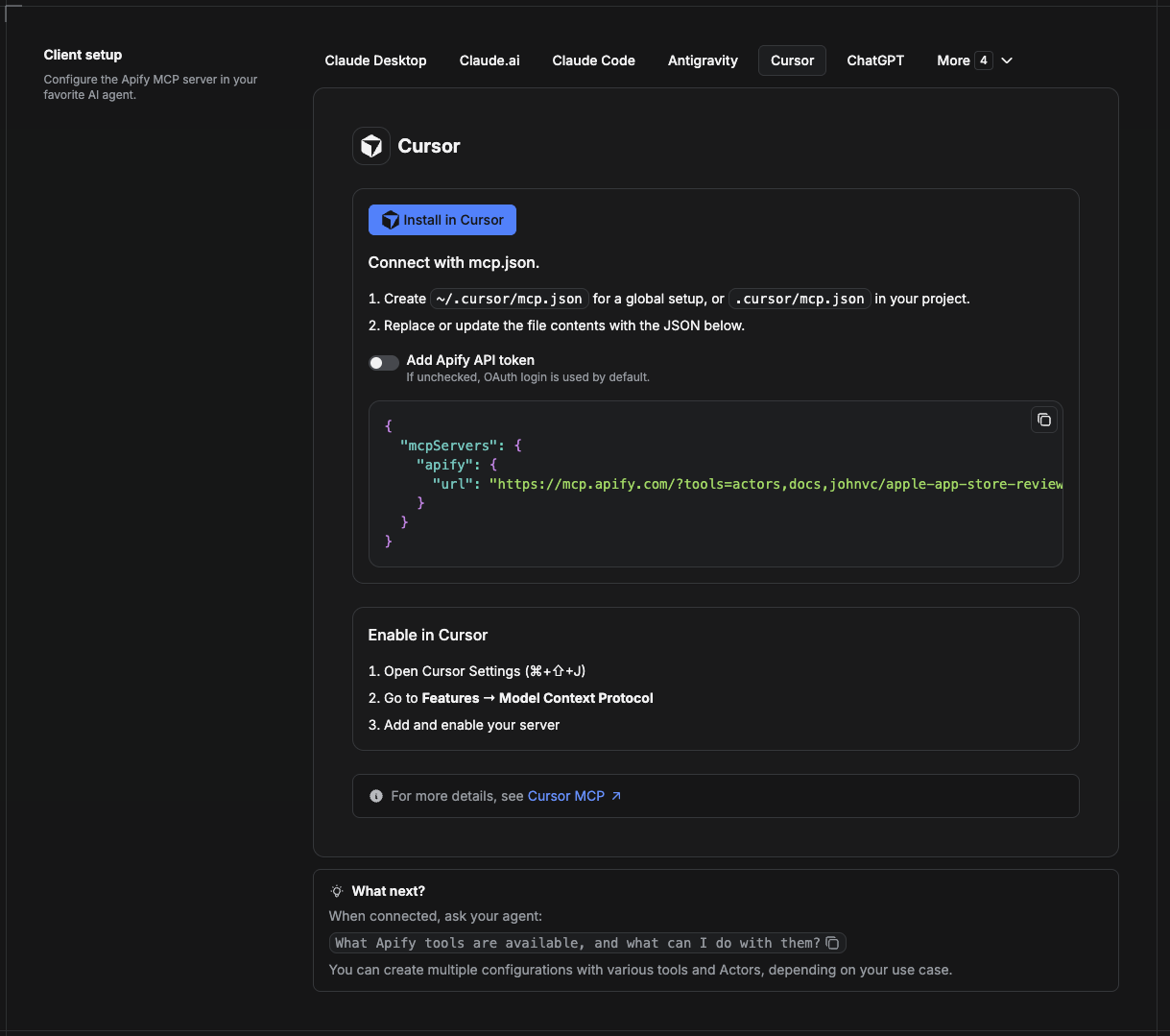
Cursor reads MCP servers from a project file at .cursor/mcp.json.
- In your project, create
.cursor/mcp.json:
{
  "mcpServers": {
    "apify": {
      "url": "https://mcp.apify.com/?tools=actors,docs,johnvc/google-jobs-scraper---pay-per-result"
    }
  }
}
- If you prefer token auth over browser OAuth, add a header:
{
  "mcpServers": {
    "apify": {
      "url": "https://mcp.apify.com/?tools=actors,docs,johnvc/google-jobs-scraper---pay-per-result",
      "headers": { "Authorization": "Bearer YOUR_APIFY_TOKEN" }
    }
  }
}
- Open Cursor → Settings → MCP and confirm the apify server is connected (green dot).
- In Composer or Chat, ask Cursor to call the Google Jobs API.
New to Cursor? Get it here: https://cursor.com/referral?code=XQP4VBLI3NNX
Install in ChatGPT
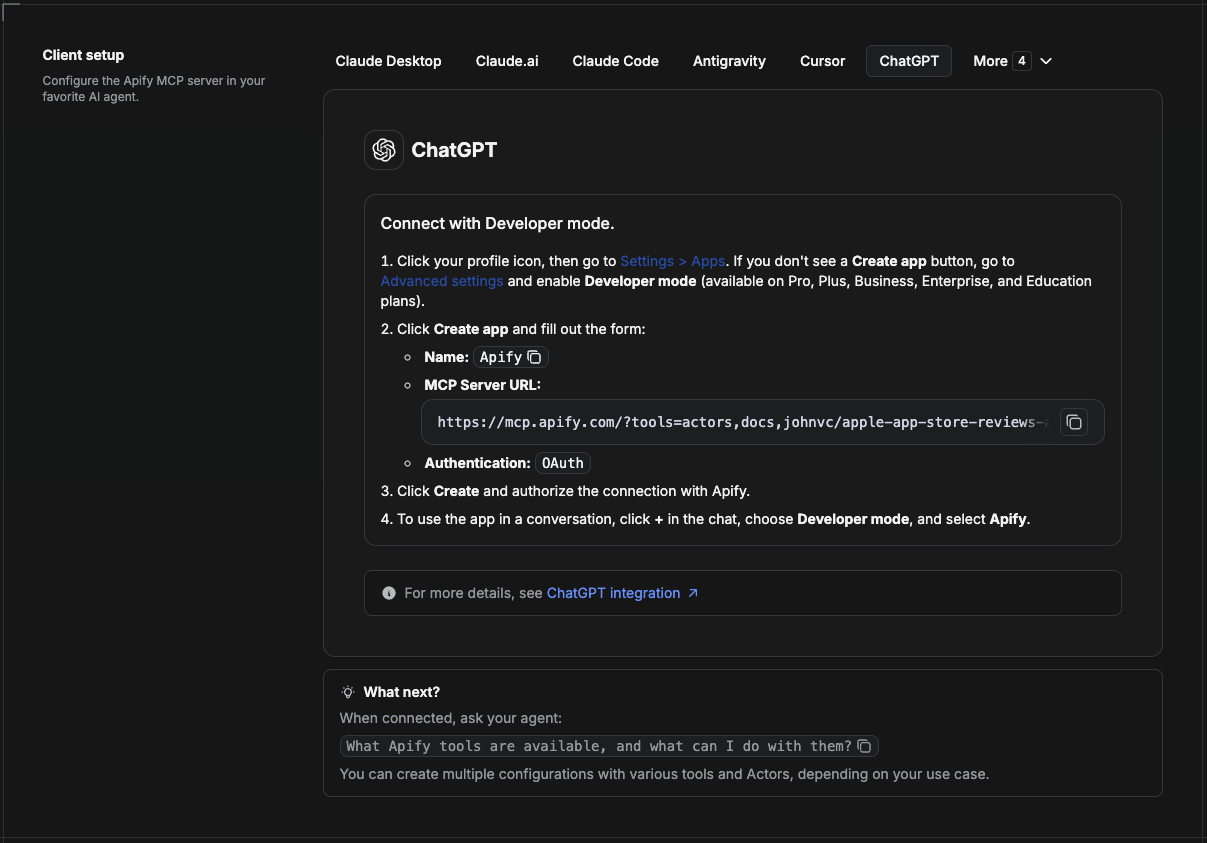
ChatGPT connects to the Apify MCP server through Developer mode (available on ChatGPT Pro, Plus, Business, Enterprise, and Education plans).
- Click your profile icon, then go to Settings > Apps. If you do not see a Create app button, open Advanced settings and enable Developer mode.
- Click Create app and fill out the form:
- Name: Apify
- MCP Server URL:
https://mcp.apify.com/?tools=actors,docs,johnvc/google-jobs-scraper---pay-per-result - Authentication: OAuth
- Click Create and authorize the connection with Apify.
- To use the app in a conversation, click + in the chat, choose Developer mode, and select Apify.
More help: https://docs.apify.com/platform/integrations/mcp
Use the Google Jobs API to power recruiting tools, market research, and analytics with reliable, structured results.
Featured Tasks
Ready-to-run examples on the Apify Store.
🤖 Ask an AI assistant about this Actor
Open a ready-to-send prompt about the Google Jobs Scraper API in the AI of your choice:
- 💬 ChatGPT
- 🧠 Claude
- 🔍 Perplexity
- 🅒 Copilot
Last Updated: 2026.10.27
Frequently asked questions
What is google-jobs-per-result MCP Server?
Google Jobs listings billed per result, via the Apify Google Jobs Scraper API, hosted MCP.
How do I install google-jobs-per-result MCP Server in Claude Desktop, Cursor, or VS Code?
Pick your client in the Install section on this page and copy the generated config into the client's config file. Step-by-step guides: Claude Desktop, Cursor, and VS Code. google-jobs-per-result MCP Server connects to the remote endpoint https://mcp.apify.com/?tools=johnvc/google-jobs-scraper---pay-per-result, so there is nothing to install locally.
Does google-jobs-per-result MCP Server support remote (HTTP) connections?
Yes. google-jobs-per-result MCP Server offers a hosted endpoint over Streamable HTTP, so HTTP-capable clients can connect to it without running anything locally.
How is google-jobs-per-result MCP Server's trust score calculated?
google-jobs-per-result MCP Server scores 52 out of 100 (Fair). The score adds six capped public signals: registry status, maintenance, popularity, license, documentation, and security. Nobody can pay for points. Read the methodology for the full formula.
Reviews
No reviews yet—Be the first to review
No published reviews yet. Used it? Tell the next person how it went.
Sign inA verified email is required to review this server.
Add badge to your README
Paste either snippet into the repository README. The image links to this listing.

Manage this listing
Claim this serverRelated servers

Scrapling MCP Server
by d4vinci · Python
Web scraping with stealth HTTP, real browsers, and Cloudflare bypass. CSS selectors supported.
mobile-mcp
by mobile-next · TypeScript
MCP server for iOS and Android Mobile Development, Automation and Testing
Firecrawl MCP Server
by firecrawl · JavaScript
Firecrawl, the context API for AI agents: search, scrape, interact with the web, plus paper search.

Xquik MCP Server
by xquik-dev · JavaScript
Xquik is the world's fastest and cheapest X (Twitter) data API with the most complete X data.

apify-mcp-server
by apify · TypeScript
Extract data from any website with thousands of scrapers, crawlers, and automations on Apify Store ⚡
Pages, crawls and URL batches as clean Markdown and JSON for AI agents, with an Evidence Record.